
Updated 13 November 2026
If you have gone looking for a CRM for photographers, most of what comes up is written for wedding photographers or general small business, often by someone paid to recommend one product. A portrait studio sells differently: a session, an ordering appointment, wall art, then years of repeat sessions. This page sets out what a photography CRM has to do for that, how to choose one, and what slow follow-up is costing you now.
What should photographers look for in a CRM? One job above the others: no enquiry goes quiet. For a portrait studio that means six things:
- A text and an email to every new enquiry within minutes, day or night
- Website, Instagram and Facebook enquiries in one inbox, each with its source
- Follow-up for about two weeks that stops itself when the client replies or books
- Booking and reminders for the session and the ordering appointment
- Order value on every client (wall art, albums), not just the session fee
- A clear total cost: per user, per text and per transaction
Choose on the first one, how fast a reply goes out, then everything else.
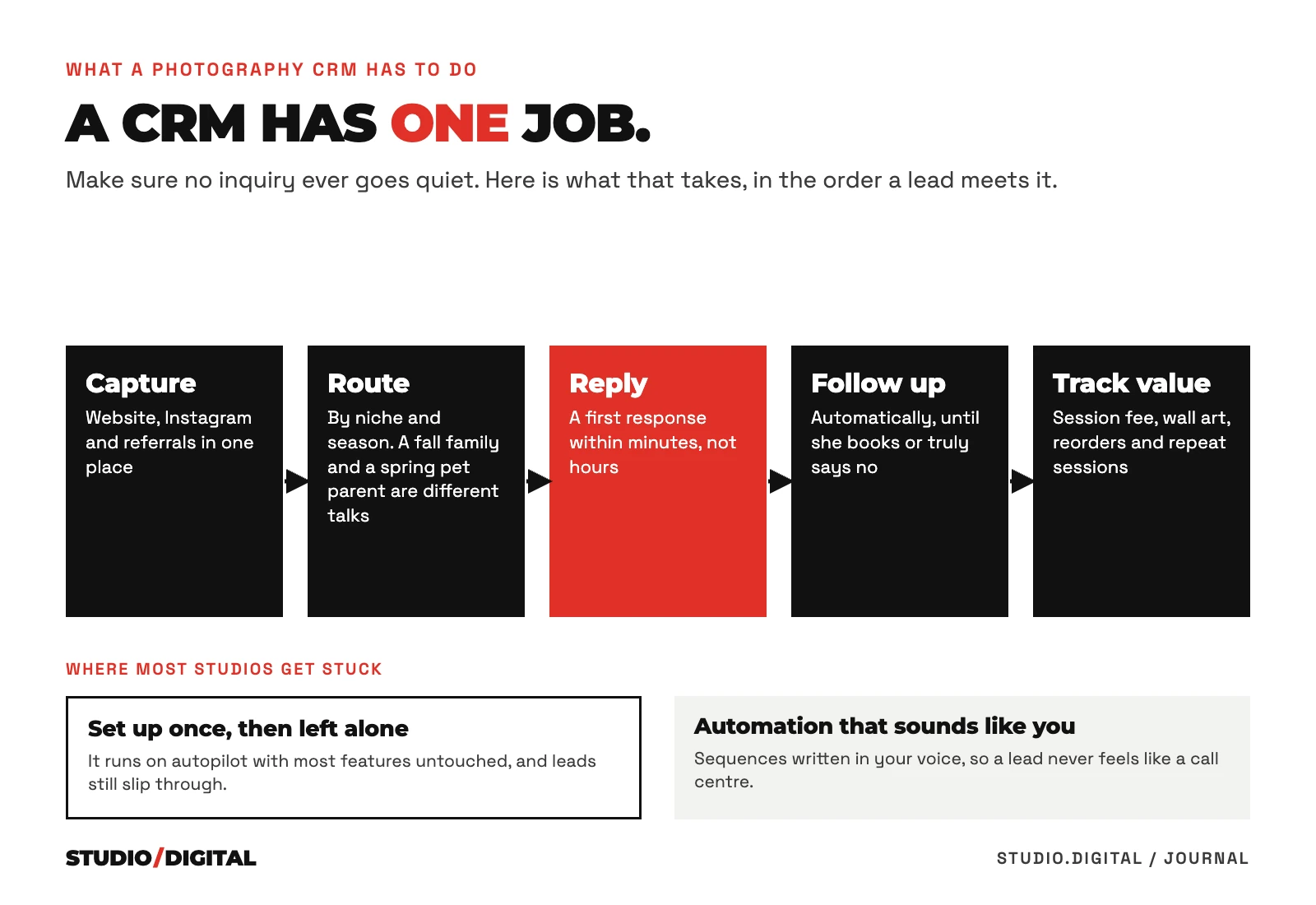
What a photography CRM must do.
- CaptureWebsite, Instagram, Facebook and referrals in one inbox
- RouteA different reply for family, pet, newborn and boudoir
- ReplyText and email within minutes, day or night
- Follow upUntil they book or say no, then stop
- Track valueSession fee, wall art, albums and reorders
Five jobs. Most studios are missing at least one.
| What the CRM must do | Studio app, run by you | CRM, run by you | Allio, run by Studio Digital |
|---|---|---|---|
| Capture every inquiry in one place | Check it takes Instagram and Facebook messages, not only the website form. | Usually possible. Check every source is actually connected. | Website, Instagram, Facebook and referrals land in one inbox. We connect each source. |
| First reply within minutes | Check it can send a text, not only an email. | Yes, once you write the replies and switch them on. | Text and email within minutes, written in your studio's voice. |
| Route by niche and season | Check it can send a different reply for each session type. | Possible with tags and separate forms that you build. | Family, pet, couples, boudoir and seasonal minis each get their own follow-up. |
| Follow up until they book or say no | Check how long it keeps going, and that it stops when they reply. | Yes, if someone keeps the sequences current. | Text and email follow-up, set to stop when they book or reply. |
| Track full client value | Check it records wall art and reorders, not only the session fee. | Possible with custom fields and pipeline values. | Pipeline value can carry the session fee, wall art and reorders. |
| Who keeps it running | You. | You or your team, every month. | Studio Digital, alongside your ads, email and SMS. |
| Best fit | Fewer than 10 inquiries a month, mostly referrals. | Steady inquiries and someone who enjoys running systems. | Paid ads, a high volume of inquiries, or no time to maintain it. |
Speed to lead is the whole game.
You paid for the click, the enquiry came in, and then real life happened: you were mid-session, editing, or asleep. By the time you replied, that family had booked with whoever answered first.
Source: “The Short Life of Online Sales Leads”, Harvard Business Review, March 2011 (1.25 million online leads). Not a study of photographers.
What slow follow-up costs your studio.
Put in your enquiries, booking rate and average sale. The calculator shows the bookings and sales a slow first reply or a one-touch follow-up is likely costing you, with every assumption on show.
See all 12 studio tools, including the CRM quiz further down this page.
The CRM we use and set up for client studios is Allio, built for portrait studios, with calls, texts, email and follow-up in one place so a new enquiry gets a fast first reply.
The portrait studio pipeline.
- 0 minEnquiry arrivesWebsite, Instagram, Facebook or an ad
- Minutes 1 to 5Text and email replyAutomatic, in the studio’s voice
- Hour 1Call from the studioVoicemail if nobody picks up
- Days 2 to 14Follow-up sequenceTexts and emails on days 2, 5, 10 and 14
They reply
- Consult or session bookedConfirmation, what to wear, reminders
- Ordering appointmentBooked before they leave the session
- Past clientSeasonal and milestone invitations every year
No reply by day 14
- Sequence stopsNo more chasing after day 14
- Kept on the listInvited to the next seasonal offer
| Stage | What the CRM should do automatically |
|---|---|
| New enquiry | Text and email within minutes, in your voice, then a task to call |
| Not reached yet | Follow up by text and email for at least two weeks |
| Consult or session booked | Confirmation, what to wear, reminders the day before |
| Session done | Book the ordering appointment before they leave, then remind them |
| Ordered | Record the sale value and ask for a review |
| Past client | Seasonal invitations and milestone sessions, every year |
An inbox and a spreadsheet
- Enquiries spread across email, Instagram and Facebook
- Replies when someone gets a minute
- One follow-up, if you remember
- Ordering appointments booked by hand
- No idea which ad a client came from
A CRM set up for a studio
- Every enquiry in one place, with its source
- A first reply within minutes, automatically
- Follow-up that stops when they reply
- Ordering appointments booked and reminded
- Sales value on every client, by source
How to choose a CRM for photographers.
| Photography CRM | Studio management software | |
|---|---|---|
| Built around | The enquiry, until it books | The booked client |
| Main jobs | Fast first reply, follow-up, lead source | Contracts, invoices, questionnaires, galleries |
| What it wins you | More bookings from the same enquiries | Less admin per booking |
| Check first | A text reply within minutes, follow-up that stops itself | Contract, payment and delivery in one flow |
Find the right setup for your studio.
Five questions about how your studio works today, and the kind of setup that fits.
Automation that still feels personal.
Automation should sound like the studio, not a call center. Here is what a first two weeks can look like for a new pet portrait enquiry (an example, written in the studio’s voice):
- Minute 1Text: thanks for reaching out about Bella’s portrait session, here is what happens next.
- Minute 5Email: what a session includes, and two times this week to talk.
- Hour 1A call from the studio, with a voicemail if needed.
- Day 2Text: a favourite portrait from a recent dog session.
- Day 5Email: what clients hang on their walls, and why.
- Day 10Text: still keen? Reply with a time and we will hold it.
- Day 14A last friendly check-in, then the sequence stops.

Questions studio owners ask.
What should photographers look for in a CRM?
A text and email reply to every new enquiry within minutes, every enquiry source in one inbox, follow-up that stops itself when the client replies or books, booking and reminders for the session and the ordering appointment, order value on every client, and a clear total cost. For a portrait studio, the speed of the first reply matters most.
What is a CRM in photography?
Client relationship management software for a photography business: one place that holds every enquiry and client, replies and follows up automatically, books sessions and keeps the history. A portrait studio also needs it to record what each client spends on wall art and albums.
Which CRMs do photographers use most?
In US Google results for photography CRM searches, checked 13 November 2026, the names that come up most are HoneyBook, Dubsado, Pixieset, Sprout Studio and Studio Ninja. Check any of them against the list above, especially a text reply within minutes and follow-up that stops itself.
What information should a photography CRM hold?
For each client: contact details, where the enquiry came from, the session type, every message, booked dates, and what they spent on the session and on wall art or albums. That last part shows which ads and offers actually pay.
How do I switch photography CRMs?
Export every contact with its source, status and order history first. Set up the new-enquiry reply and follow-up before anything else and test it with an enquiry of your own, then move bookings and past-client campaigns. Keep the old system open for a few weeks so nothing in progress is lost.
Is a photography CRM the same as studio management software?
Not quite. A CRM is built around the enquiry: a fast first reply and follow-up until the client books. Studio management software is built around the booked client: contracts, invoices, questionnaires and galleries. Many tools now do some of both, so check the parts that win bookings first.
How much does a photography CRM cost?
Most charge a monthly subscription, then extras: seats for each user, a charge per text message, and card processing on every payment. Add those up for a busy month before you compare prices.
What is the best CRM for photographers?
The best one for a portrait studio is the one that replies to a new enquiry by text within minutes, follows up until the client says yes or no, and tracks order value. Most popular photography CRMs can do this; what matters is that it is set up and kept running.
Do I need a CRM as a photographer?
If you get more than a handful of enquiries a month, or run paid ads, yes. Without one, enquiries wait and follow-up stops when you are busy.
What is speed to lead?
How fast a new enquiry gets its first reply. A Harvard Business Review study of 1.25 million online leads found firms that tried to reach a lead within an hour were nearly seven times as likely to qualify it as firms that waited longer.
Can a CRM send texts as well as emails?
Many can. Check that texting is included, what each text costs, and that replies come back to the same inbox.
What CRM does Studio Digital use?
Allio, our CRM, set up for each studio with follow-up written in the studio’s voice and connected to its ads and booking pages.